


Marvel RivalsInformational
Black Panther Rival
Learn how to dominate as Black Panther in Marvel Rivals, discover his key rivalries (including Killmonger), and explore our boosting services to level up fast.
Read more

If you’re switching between PC and console (or even between PC launchers), it’s easy to assume everything “just syncs.” In reality, Marvel Rivals has a very specific account-linking system with rules about primary characters, cooldowns, platform-exclusive cosmetics, and even rank/leaderboard separation by device. Once you understand what does sync and what doesn’t, you can avoid the two biggest headaches players run into: (1) linking the “wrong” account and (2) expecting ranks or platform-exclusive items to carry over when they can’t. This guide explains crossplay, account linking, and cross-progression in one clear place—what you can share, what you can’t, and how to set it up safely so you don’t lock yourself into a 180-day cooldown mistake.
Check out some of our most popular Marvel Rivals services:
Crossplay means you can queue into the same match with players on other platforms. It’s about who you can play with.
Cross-progression means you can log in on different platforms and keep using the same overall profile—your unlocked heroes, cosmetics, collections, and purchases. It’s about what you can keep when you switch devices.
Here’s the key thing most players miss: crossplay can exist without cross-progression. Marvel Rivals originally had crossplay first, then later added cross-progression through account linking. So you need to treat them as two separate systems with different rules.
Marvel Rivals commonly uses these terms:
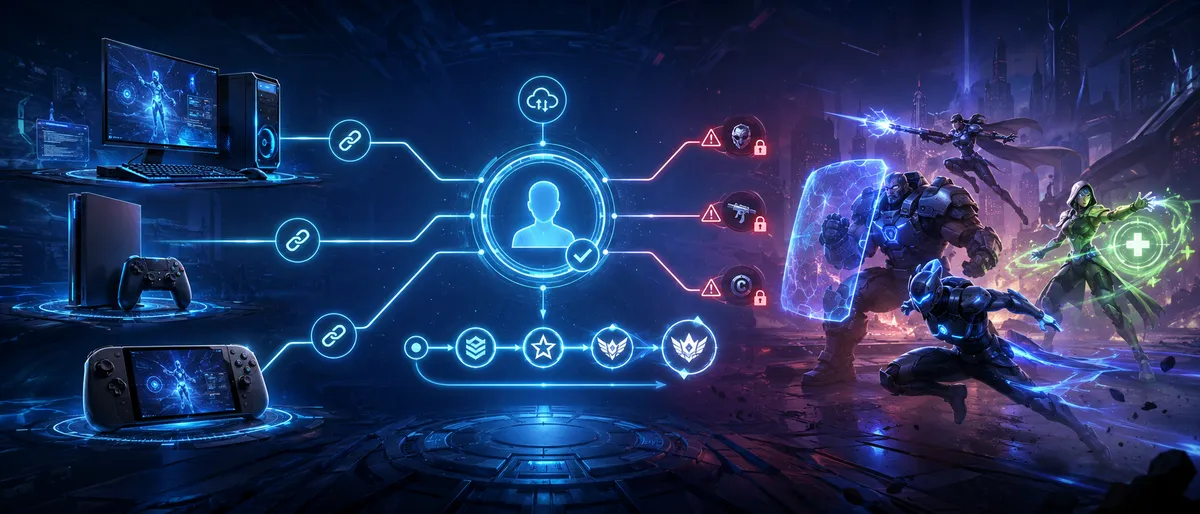
Supported platforms for cross-progression account linking include: Steam, Epic, Loading Bay, PlayStation, and Xbox.
Crossplay determines whether you can party up and matchmake with friends on other platforms. In Marvel Rivals, the big “split” is usually Ranked vs non-Ranked.
In most non-Ranked modes, crossplay is broadly available—so friends on PC and console can play together in the same party.
In Ranked, matchmaking is device-based for competitive fairness. In practice, that means PC and console ranked play are not mixed the same way casual modes are. (You can still play Ranked on your platform; you just can’t always bring cross-platform friends with you into Ranked.)
What this means for you:
Here’s what crossplay is great for:
If your goal is “we just want to play together,” crossplay solves that in most cases.
Crossplay does not mean everything is shared, and it does not mean every playlist will let every platform party together.
Common “can’t” situations:
If your main goal is to play Ranked with cross-platform friends, you’ll want to double-check the current Ranked restrictions each season—but the consistent theme is that Ranked tries to keep competitive pools separated.
Some players like disabling crossplay for consistency (especially if they want to avoid mixed-input or mixed-hardware lobbies in casual modes).
Reasons to keep crossplay ON:
Reasons to turn crossplay OFF (usually on console):
If you’re on PC, crossplay toggles can be more limited depending on your client and current version. Console players typically have more control over crossplay options.
Marvel Rivals cross-progression works through account linking:
Important: progress is stored on the character, and accounts and characters have historically been 1-to-1 before linking. After linking, the “shared” experience happens by choosing one primary character.
This is the #1 “read it twice” rule:
Your character data is not merged.
If you have progress on two separate accounts, linking them does not blend them together into one super-account. Instead, you pick a primary character and the others remain separate.
That means:
This is why choosing your primary character carefully matters so much.
Once your accounts are linked and you choose a primary character, cross-progression is designed to let you use that same character on any linked platform.
What you can typically share through your primary character:
Think of it as: if it’s part of your character’s ownership and it isn’t restricted by platform rules, it’s intended to be accessible on every platform you’ve linked.
Marvel Rivals is very explicit about several important exceptions.
Rank and leaderboards do not sync across platforms
Even though you have one primary character, your battle data, rank, and leaderboard entries are saved separately by device (PC, PlayStation, Xbox). So your PC Ranked identity and your PlayStation Ranked identity are treated as separate competitive records.
Platform-exclusive cosmetics do not carry over
If a costume is marked platform-exclusive, it can only be used on its designated platform. If you log in on another platform while wearing it, you’ll typically appear in a default costume instead.
Certain bundle purchase behavior is restricted by platform rules
If you’ve already purchased specific bundles on one platform (notably PlayStation or Xbox), you may not be able to repurchase the same bundle again on that platform due to platform restrictions. In those cases, buying it on a different linked platform may be the only option.
Third-party connections don’t automatically “follow” your linking
Things like Discord binding or Twitch Drops linking may not automatically update just because you linked your Marvel Rivals accounts. You may need to check and re-bind manually after linking.
Faction and tournament operations can be device-restricted
Certain competitive or faction-related features can require using a specific device to complete the action (for example, if a faction is PC-based, joining or participating may require PC).
This is where many players get surprised, so it’s worth stating clearly:
Why this matters:
There is also an important seasonal reward detail: season rank rewards can be based on the highest valid rank you achieved on any linked device (with some caveats about linking/unlinking timing). This is great news for multi-platform players—just make sure you understand your linking status at season end.
If you want the safest linking process, follow this order and mindset:
Step 1: Decide which character you want as your primary
Before you link anything, decide your “main home” character. The best primary is usually the account that has:
Step 2: Log into the platform account that owns your desired primary character
Start the linking process from the account you want to “lead” your cross-progression life.
Step 3: Go to the account linking/binding menu
In-game, you’ll typically find it under something like:
Settings → Other → Account (or Account Linking/Account Binding)
Step 4: Link one additional platform at a time
Pick a platform other than your current login and complete verification. Repeat for each platform you want to connect.
Step 5: If prompted, choose your primary character carefully
If the game detects multiple characters across linked accounts, it will ask you to pick a primary. Remember: no merging. This decision matters.
Step 6: Confirm, then log into each platform once
After linking, log into each platform at least once so everything refreshes correctly (especially if you care about seasonal rank settlement visibility on those devices).
Check out some of our most popular Marvel Rivals services:
Marvel Rivals includes a specific warning for PlayStation linking: account authorization can cause the system to automatically use the PlayStation account that is already logged into the PlayStation website in your browser session.
Practical safety steps:
Also note: due to PlayStation virtual asset transfer policies, once you bind a PSN account, you generally cannot swap to a different PSN account later—you can only re-link the original PSN account if needed. So treat your PSN choice as a “measure twice, cut once” moment.
When you’re forced to pick a primary character, use this checklist:
Then decide based on your real play pattern:
Because characters are not merged, it’s usually better to have one clear “main” than to keep trying to maintain two half-progressed profiles.
Marvel Rivals allows switching your primary character after linking, but there is a cooldown to prevent frequent switching.
Practical implications:
The safest mindset: treat primary switching as a real decision, not a casual toggle.
Unlinking is possible, and it restores characters back to their original accounts (if the unlinked account had a character).
However, the big risk is the cooldown:
That’s a huge deal. Unlinking isn’t something to do impulsively.
Good reasons to unlink:
Bad reasons to unlink:
If you’re unsure, don’t unlink. The cooldown makes “undo mistakes” slow.
Here are the most common real-world situations and what to expect.
Good news: cross-progression linking supports multiple PC platform logins (including Steam and Epic), so you can link them and keep the same primary character.
What to watch out for:
This is the classic cross-progression use case:
Two common surprises:
This can happen due to platform purchase rules—especially if the platform treats bundles as “already owned” in a way that blocks repurchase.
What to do:
That’s normal. Marvel Rivals uses primary character selection, not data merging.
Your options:
Best practice: treat your non-primary character as a “stored profile,” not as something you can fuse into your main.
That’s also expected in a device-based competitive system. Most competitive ladders avoid mixing PC and console ranked pools because input methods differ and fairness becomes hard to manage.
Your best options:
If linking fails, loops, or binds the wrong account, try this checklist before doing anything drastic:
If you suspect you are in a cooldown state, the smartest move is to stop clicking and confirm your status in the account linking screen. That’s better than accidentally triggering longer restrictions.
If you want a simple explanation you can tell teammates:
That alone prevents most misunderstandings.
Check out some of our most popular Marvel Rivals services:
A lot of players link accounts and still feel stuck because the real struggle isn’t the menu—it’s what happens after:
BoostRoom helps you turn cross-platform play into an advantage by focusing on:
If you’re bouncing between PC and console or playing with a crossplay friend group, having a clear plan matters more than ever—and BoostRoom is built around making that plan simple.
Can I play Marvel Rivals with friends on other platforms?
Yes in most casual and custom modes. Crossplay is designed to let PC, PlayStation, and Xbox players party up and play together in non-Ranked playlists.
Can I play Ranked with friends on different platforms?
Ranked matchmaking is device-based for competitive fairness, so cross-platform Ranked parties are restricted. In practice, PC and console Ranked are not mixed the same way casual modes are.
Does Marvel Rivals have cross-progression?
Yes. Cross-progression works by linking platform accounts together and selecting a primary character. After that, logging in from any linked platform uses the same primary character.
Do my two accounts merge if I link them?
No. Your character data is not merged. If you have multiple characters across linked accounts, you must choose one as your primary character.
What carries over with cross-progression?
Your primary character’s progress, collections, and most paid content can be accessed on linked platforms, except where platform restrictions apply (like platform-exclusive cosmetics).
What does NOT carry over?
Rank and leaderboards are saved separately by device (PC, PlayStation, Xbox). Platform-exclusive costumes can only be used on their designated platform. Some platform purchase rules can block repurchasing certain bundles on the same platform.
Can I switch my primary character later?
Yes, but switching has a cooldown. It’s meant to prevent frequent swapping, so choose carefully.
Can I unlink accounts if I change my mind?
Yes, but unlinking can trigger a long platform cooldown (commonly 180 days) before that platform can be linked again. Don’t unlink unless you’re sure.
Will linking automatically fix my Twitch Drops or Discord connections?
Not automatically. After linking, you may need to manually check and re-bind third-party connections like Twitch or Discord.
More Reads
Learn how to dominate as Black Panther in Marvel Rivals, discover his key rivalries (including Killmonger), and explore our boosting services to level up fast.
Read more
“Loadout” in Marvel Rivals isn’t like a traditional shooter where you pick attachments, perks, and equipment. In Marvel Rivals, your loadout is the combination of role identity + hero choice + team synergy + settings + habits that you bring into every match. When those pieces match your role, you feel durable as a Vanguard, lethal as a Duelist, and clutch as a Strategist—even if your teammates are random and your mechanics aren’t perfect.
Read more
Explore the epic Adam Warlock rival storyline and learn how to master Adam Warlock in Marvel Rivals. Get tips, strategies, and discover our boosting services to level up fast!
Read more
Marvel Rivals is a free-to-play game, so the Battle Pass and skins are how it keeps the lights on. That’s totally fine—as long as you know what you’re buying and you’re not spending money just because the store made you feel rushed. The tricky part is that Marvel Rivals doesn’t use one simple “buy skin = done” system. It uses multiple currencies, bundles, a page-based Battle Pass, and extra cosmetic layers like recolors and ultimate VFX. If you don’t understand the structure, it’s easy to waste currency on the wrong thing and still feel like you “got nothing.” This guide breaks everything down in plain language: how the Battle Pass works, how the currencies connect, how bundles are priced, what’s actually worth paying for, and what to skip (especially if you’re on a budget). You’ll also get smart, low-stress rules for collecting cosmetics without falling into FOMO.
Read more